| Platform | Best Use | Useful Public Data | Main Limit |
|---|---|---|---|
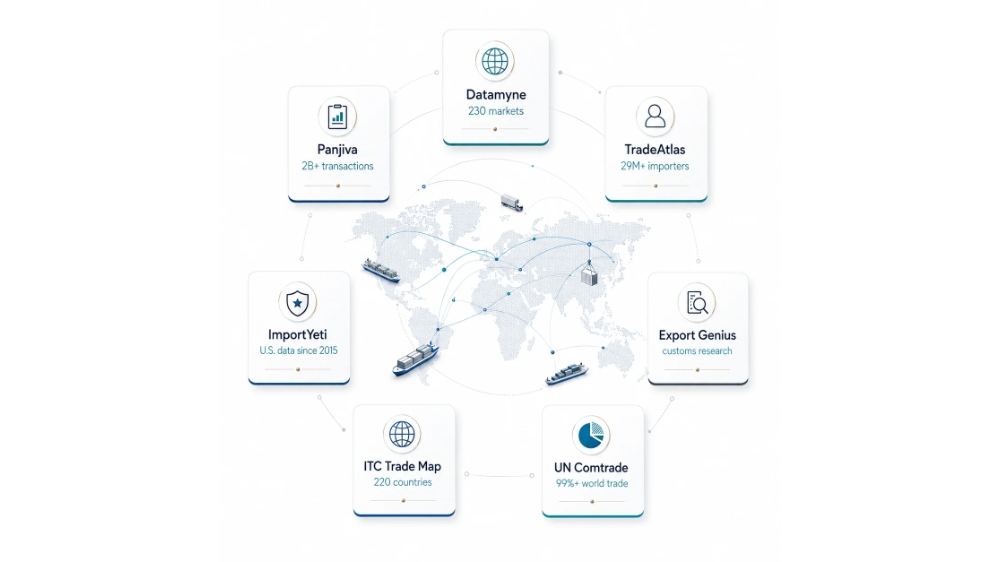
| TradeData .Pro | End-to-end trade research: detailed records, buyers and outreach | 230+ countries and trade regions; 8B+ trade records; shipment, import and export data with verified company contacts | Dataset types and fields vary by country |
| Datamyne | Shipment and competitor research | 230 markets; 500M+ records added per year; 60,000+ U.S. maritime B/L records per day | Global HS/HTS-level database covers the past three years; pricing is not publicly listed |
| Panjiva | Company and supply-chain relationships | 2B+ transactions; 9M company profiles; 13M company relationships | Detailed source trade data comes from 22 countries only |
| TradeAtlas | Buyer and supplier discovery | 230 countries; 29M+ importers; 20M+ exporters; 3.4B+ trade records | Search result limits vary by plan; HS code search supports 6 digits only |
| ImportYeti | U.S. supplier research | U.S. import history from 2015; monthly updates | Detailed U.S trade data but does not show every U.S. import movement |
| Export Genius | Country-specific customs research | Detailed customs, B/L, statistical, mirror and transit datasets | Daily search caps on all plans except the top tier |
| ITC Trade Map | Market selection | About 220 countries and territories; about 5,300 HS product groups | Not built mainly for shipment-level research |
| UN Comtrade | Official trade statistics | About 200 reporting economies; 99%+ of world merchandise trade | Not a buyer-supplier shipment database |
Commercial-platform figures are vendor-reported and measure different things. A shipment record, company profile, trade relationship, and covered market should not be compared as if they were the same unit.
Best Match by Current Platform
| If You Use | Main Task | Alternatives to Test |
|---|---|---|
| Volza | Detailed shipment research | Datamyne, Panjiva, TradeData.Pro |
| Volza | Find active importers | TradeAtlas, Datamyne |
| TradeInt | Buyer and supplier search | TradeAtlas, TradeData.Pro |
| TradeInt | Competitor and shipment analysis | Datamyne, Panjiva, TradeData.Pro |
| Trademo | Trade prospecting | Panjiva, Datamyne, TradeAtlas |
| Trademo | Sanctions, export controls or compliance | Use a dedicated compliance platform |
| ImportGenius | Detailed U.S. shipment research | Datamyne, ImportYeti, Panjiva |
| Tendata | Buyer prospecting | TradeAtlas, TradeData.Pro |
| Tendata | Shipment and competitor research | Datamyne, Panjiva, TradeData.Pro |
When you compare any global trade data platform, look at the exact country dataset before you look at the total record count. A useful country coverage database should make it clear whether a market includes detailed trade data, shipping data, or another type of record.
TradeData.Pro
TradeData.Pro brings global import-export records, bill-of-lading data, buyer and supplier information, company profiles, and market insights into one platform. It can be used to check active trading companies, review supplier relationships, compare markets, and follow trade activity before committing sales or sourcing resources.
Descartes Datamyne
Use it for: importer research, supplier research, competitor shipments, ports, carriers, trade lanes, and repeated monitoring.
| Vendor-reported markets | 230 |
|---|---|
| Records added per year | 500M+ |
| U.S. maritime B/L records added per day | 60,000+ |
| U.S. B/L processing | About 24 hours after receipt from CBP |
Datamyne works best when you need to move from a broad product search to specific buyers, suppliers, and shipments. An industrial-valve seller, for example, can combine an HS code, product description, destination, importer, and date range instead of relying on one keyword.
From there, the useful checks are straightforward:
- shipments in the last 12 months;
- shipment frequency;
- repeat suppliers;
- new suppliers;
- changes in sourcing country;
- ports and trade routes.
Company names also need attention. The same business may appear under different spellings, addresses, subsidiaries, or export entities. If those records are not cleaned properly, one supplier can look like several. A trade-data processing process that removes duplicates and standardizes company and shipment fields can make a real difference to the final result.
Skip it when: you only need a few company names each month and do not need detailed shipment analysis.
Panjiva
Use it for: supplier networks, company relationships, competitor sourcing, company matching, and larger supply-chain research projects.
| Transaction records | 2B+ |
|---|---|
| Source-data countries | 22 |
| Company profiles | 9M across 190+ countries |
| Company-to-company relationships | 13M |
Panjiva is useful when company identity matters as much as the shipment itself. Its figures also show why broad “country coverage” claims can be misleading: company profiles reach 190+ countries, while detailed source trade data comes from 22 countries. Those are not the same type of coverage.
The company-matching issue is easy to see with a simple example:
- ABC Manufacturing Co Ltd
- ABC Manufacturing Co., Ltd.
- ABC MFG
- ABC Manufacturing Shenzhen
If a system counts those four names separately, one supplier can look like four. That can throw off supplier concentration, shipment totals, and competitor research.
Panjiva is most useful when you want answers to questions like these:
- Which supplier serves several competitors?
- Does a buyer rely heavily on one supplier?
- Are several supplier names part of the same company group?
- Which companies repeatedly trade with each other?
Skip it when: your main requirement is a simple list of importer names and contact details.
TradeAtlas
Use it for: finding importers, exporters, buyers, suppliers, and companies already trading a product.
| Countries | 230 |
|---|---|
| Importer companies | 29M+ |
| Exporter companies | 20M+ |
| Trade and shipment records | 3.4B+ |
TradeAtlas fits sales work well because you can start with actual trade activity rather than a broad company directory. Search by product name or HS code, find companies already importing the product, and then look at the suppliers behind those shipments.
Take ceramic tiles as an example. A normal business directory may give you builders, retailers, designers, and construction companies. A trade-data search narrows that list to businesses with visible activity around the relevant product or HS code. This is the same practical use case behind finding buyers from trade activity.
For each buyer, look at:
- activity in the last 12 months;
- repeat purchases;
- supplier countries;
- product descriptions;
- supplier changes;
- business type.
One point still needs checking outside the trade record: what kind of company is it? An importer may be a distributor, factory, retailer, purchasing company, trader, or logistics-related company.
Skip it when: you need deep entity matching or a wider supply-chain relationship map rather than buyer discovery.
ImportYeti
Use it for: U.S. supplier discovery, competitor research, and checking overseas companies connected with U.S. importers.
| U.S. import data available from | 2015 |
|---|---|
| U.S. import update frequency | Monthly |
| U.S. export data available from | 2015 |
| U.S. export delay | About 30–60 days |
A common sourcing use case is simple: search several U.S. companies that already sell the product you want to manufacture, then compare the overseas suppliers that keep appearing in their shipment history.
The results still have limits. U.S. Customs and Border Protection allows eligible parties to request confidential treatment of certain names and addresses contained in vessel-manifest records.[1]
Transport mode can also change what you see. CBP uses separate manifest processes for air, ocean, truck, and rail cargo.[2]
So a company with little visible ocean activity may still import by air, truck, rail, another legal entity, or through records that are not public.
When you compare U.S. databases, look at the fields rather than the headline coverage claim. A United States trade-data page shows the kind of detail worth checking: company names, HS codes, descriptions, quantities, values, origin, transport mode, and ports.
Skip it when: you need broad company-level coverage across many countries or very frequent shipment monitoring.
Export Genius
Use it for: customs research in specific countries where the available fields match your project.
| Data Type | Useful For |
|---|---|
| Detailed customs data | Importer, exporter, HS code, quantity, value and product research |
| Bill-of-lading data | Shipper, consignee, route, port and shipment research |
| Statistical data | Country and product market size |
| Mirror data | Estimating trade when direct data is unavailable |
| Transit data | Trade routes and goods moving through hubs |
The useful part here is not the total number of markets. It is the type of record available in the market you care about.
Mirror data, for example, can fill part of a gap when one side of a trade does not publish suitable direct data. If Country B reports imports from Country A, those imports can provide a mirror view of Country A’s exports. The mirror-data method only works when useful data is available from at least one side.
Transit data needs a different reading. Goods moving through a port or free-trade hub are not automatically local demand; they may simply be passing through on the way to another market.
Before paying: request a recent sample containing your country, HS code, product, date range, importer, exporter, value, and quantity fields.
ITC Trade Map
Use it for: deciding which countries deserve sales or sourcing research before paying for company-level shipment data.
| Countries and territories | About 220 |
|---|---|
| HS product groups | About 5,300 |
| Main outputs | Trade value, quantity, growth, market share, partner countries |
The International Trade Centre provides annual, quarterly, and monthly trade information and also includes a directory of importing and exporting companies.[3]
If you are comparing several countries for the same product, look at:
- current import value;
- three- and five-year growth;
- top supplier countries;
- supplier concentration;
- quantity changes;
- market-share changes.
A $500 million market is not automatically the better target. If it is shrinking while a $150 million market is growing quickly, the smaller market may deserve more work.
A market insight view can support the same first step: check product and market trends before you spend time building a company list.
Skip it when: you need shipment-by-shipment supplier relationships.
UN Comtrade
Use it for: official country-level trade statistics, historical analysis, HS-code research, and supplier-country comparisons.
| Reporting economies | About 200 |
|---|---|
| Share of world merchandise trade represented | More than 99% |
| Main dimensions | Reporter, partner, product, flow, value, quantity and period |
UN Comtrade is one of the main official databases for annual and monthly merchandise-trade statistics.[4]
Typical questions it can answer include:
- Which countries import the most of this product?
- Which country is gaining supplier share?
- How quickly is an HS-code market growing?
- How has trade between two countries changed?
Import and export figures from two trading partners do not always match exactly. Timing, valuation, classification, re-exports, confidentiality, and partner-country rules can all create differences.[5]
Skip it when: your main goal is finding the individual buyer and supplier behind a shipment.
Turn trade records into a working buyer, supplier, and market shortlist
Instead of checking trade records in isolation, TradeData.Pro lets users search trade activity, examine company and trading-partner information, review market patterns, and narrow research to the companies and countries that match a real sales, sourcing, or competitor-analysis task.
Data Fields That Matter
| Field | What You Can Do With It | Common Problem |
|---|---|---|
| Importer | Find active buyers | May use another legal entity |
| Exporter | Find suppliers | May be a trader rather than a factory |
| HS Code | Search a product category | One code can include several products |
| Product Description | Check the actual goods | Descriptions can be short or inconsistent |
| Quantity | Compare shipment size | Units can differ |
| Customs Value | Estimate declared trade value | Not the same as retail sales or final landed cost |
| Weight | Compare cargo movement | Poor measure for high-value/light products |
| Port | Study trade routes | Port does not always equal final destination |
| Shipment Date | Check current activity | Can differ from database update date |
| Transport Mode | Separate sea, air, road and rail | Not available in every dataset |
The U.S. Census Bureau defines customs value separately from CIF value. CIF adds freight, insurance, and related import charges to customs value.[6] That is why customs value should not be treated automatically as company revenue or final delivered cost.
HS Code Rules
| International HS level | 6 digits |
|---|---|
| Commodity groups | 5,000+ |
| Countries and economies using HS | 200+ |
| Share of international merchandise classified with HS | 98%+ |
The World Customs Organization maintains the Harmonized System and states that it contains more than 5,000 commodity groups, each identified at the international level by a six-digit code.[7]
Countries can add their own digits after the international six-digit level. The U.S. International Trade Commission notes that the first six digits are harmonized internationally, while later digits in the U.S. HTS add national detail.[8]
- Do not copy a 10-digit code from one country and assume it works in another.
- Search both HS code and product description.
- Check known companies to discover the descriptions used in real records.
- Review HS revisions when studying long historical periods.
Buyer Check
| Check | Useful Window | What to Look For |
|---|---|---|
| Recent activity | Last 12 months | Is the company still importing? |
| Purchase pattern | 12–36 months | Regular, seasonal or one-off? |
| Supplier count | 24–36 months | One supplier or several? |
| Supplier changes | 24–36 months | Are new suppliers appearing? |
| Product match | Current records | Does the description match your product? |
| Origin countries | 24–36 months | Where does the buyer already source? |
A fixed rule such as “five shipments means a good buyer” is not useful. A machinery importer, fashion retailer, chemical distributor, and raw-material buyer can all have very different shipment patterns.
Supplier Check
| Trade-Data Signal | What It Supports | What It Does Not Prove |
|---|---|---|
| Repeated exports | Export experience | Product quality |
| Several established buyers | Commercial activity | Factory ownership |
| Long shipment history | Ongoing trade activity | Financial strength |
| Known-brand customer | A visible trade relationship | Approval for your product |
| Large shipment volume | Capacity to move goods | Available production capacity |
The exporter shown in a customs record may be a factory, trading company, agent, group company, or another export entity. For a large order, that business still needs to be verified separately.
Coverage Red Flags
| What You See | What It May Mean | What to Check |
|---|---|---|
| No importer found | Another company name or missing source data | Legal names, subsidiaries, transport mode |
| No supplier found | Confidentiality, trader or freight forwarder | Related entities and shipment parties |
| Very few shipments | Air, truck or rail trade may be missing | Transport coverage |
| Different counts between platforms | Different sources or matching rules | Date range, duplicates, master/house bills |
| Large value differences | Different valuation or aggregation methods | Customs value, CIF, currency and units |
| Supplier list looks incomplete | Domestic sourcing is invisible | Domestic company sources |
Even official U.S. trade data can contain reporting mistakes, late records, missing information, classification problems, and other nonsampling errors.[9] Commercial databases can clean source records, but they cannot rebuild information that was never reported or disclosed.
Cost Check
| Cost Item | Question to Ask |
|---|---|
| Country access | Which countries are included in the base plan? |
| User seats | How many team members can use the account? |
| Search limits | Are searches unlimited or credit-based? |
| Downloads | How many records can be exported? |
| HS-code limits | Is access restricted to selected codes? |
| History | How many years are included? |
| Contacts | Are employee contacts included or sold as credits? |
| Alerts | How many companies or searches can be monitored? |
| Contract | Monthly, annual or multi-year? |
Use a real task to compare cost. For example:
Find 100 active U.S. importers of aluminum cookware.
For each platform, record how many useful companies you find, the latest shipment date, missing fields, duplicate companies, irrelevant records, export limits, and the time needed to clean the result.
Five-Search Test
Before you buy, test at least five records or relationships you already know:
- Importer A: a known active buyer.
- Importer B: another known buyer using a different supplier.
- Supplier A: a known exporter with known customers.
- Product + HS code: check missing and irrelevant results.
- Recent shipment: check the latest available date.
| Score | Test |
|---|---|
| 0–5 | How many known relationships were found? |
| Freshness | How old is the latest visible shipment? |
| Fields | Are importer, exporter, quantity, value and description available? |
| Matching | Are company-name variations grouped correctly? |
| Noise | How many irrelevant product results appear? |
| History | Does the date range cover your research period? |
| Export | Can you download enough records? |
If a database misses three of five known relationships, several billion unrelated records do not solve the coverage problem for your market.
FAQ
Why can’t I find a company that I know imports?
Check legal names, subsidiaries, freight forwarders, transport mode, confidentiality, and the platform’s country coverage.
Can customs data show the exact purchase price?
Not always. Declared customs value is not automatically the final invoice, landed cost, or resale price. U.S. customs value, for example, excludes certain freight, insurance, and import charges that are included when calculating CIF value.[10]
Can trade data identify the real factory?
Sometimes. The exporter may also be a trader, agent, or related company. Verify the business independently.
Are air shipments included?
It depends on the dataset. Some customs sources cover several transport modes; some shipment databases rely mainly on ocean data.
Can I calculate competitor revenue from shipment data?
No. Shipment count, cargo weight, and customs value can show changes in activity, but they do not equal revenue. Domestic sourcing, prices, product mix, inventory, and margins are missing.
Are employee contacts taken from customs records?
Usually not. Contact information normally comes from separate company-information sources. A shipment record can support that a company imported a product; it does not prove which employee approved the purchase.
Finally
Use the platform that performs best on your own five-record test. Datamyne reports 230 markets and 500M+ new records a year; Panjiva reports 2B+ transactions and 13M company relationships; TradeAtlas lists 29M+ importers and 3.4B+ trade records. Those numbers show scale, but they do not tell you whether the data works for your market. Check the latest shipment date, company names, HS code, product description, quantity, value, transport mode, historical depth, and export limits. If a platform finds four or five known relationships with clean, recent records, it is doing useful work. If it misses most of them, a larger advertised database does not make up for poor coverage where you actually need it.
You can run the same five-record test on TradeData.Pro — our free demo lets you search relationships you already know and check the fields that matter to you.